Three evenings, not three months
How does this work?
You write down who belongs to whom. The site works out the generations, the ages and the map on its own. Below is a finished tree, and then every screen you would touch to build one, photographed from the working site rather than drawn.
Nothing here needs an account to read, and a tree stays private until you decide otherwise.
What you end up with
A real one, finished
The Vang family: twelve people, three generations, four countries. This is a published tree exactly as a stranger following a link would see it.

And every name opens
One person, their photograph, the years, the city, and the family around them, each of those a link to the next person.
This is the whole of what a published page carries. No street address, no phone number, no email. Those exist, they are just yours.
Rather look at a real one than a picture of it? Open the Vang family tree

Before you type anything
The typing is the easy part. Everything that actually matters happens away from a screen, and it has a deadline nobody sets.
01
Ask while you can
Sit down with your parents and grandparents. Names, villages, years, who married whom. This is the part that cannot be done later.
02
Write it down roughly
A phone note or the back of an envelope is fine. Nothing has to be right the first time, and a rough year beats a blank.
03
Then type it in
An hour at a keyboard, and the eight steps below. The site does the layout, the ages and the map on its own.
Step by step
Everything you would actually do
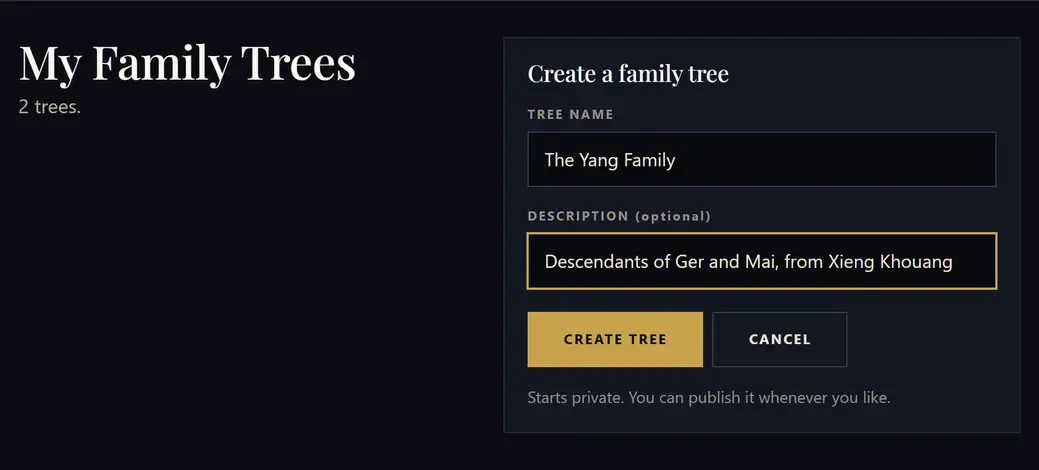
Make a tree and give it a name
Sign up with an email address you can open, then press Create Family Tree. The name is the family’s, not yours. “The Yang Family” rather than your own account name, because relatives are going to recognise it by the clan.
The description is optional and worth the twenty seconds. A cousin who finds three Yang trees in search picks the right one by reading “from Xieng Khouang”.
It starts private. Nothing you do next is visible to anyone until you decide otherwise.
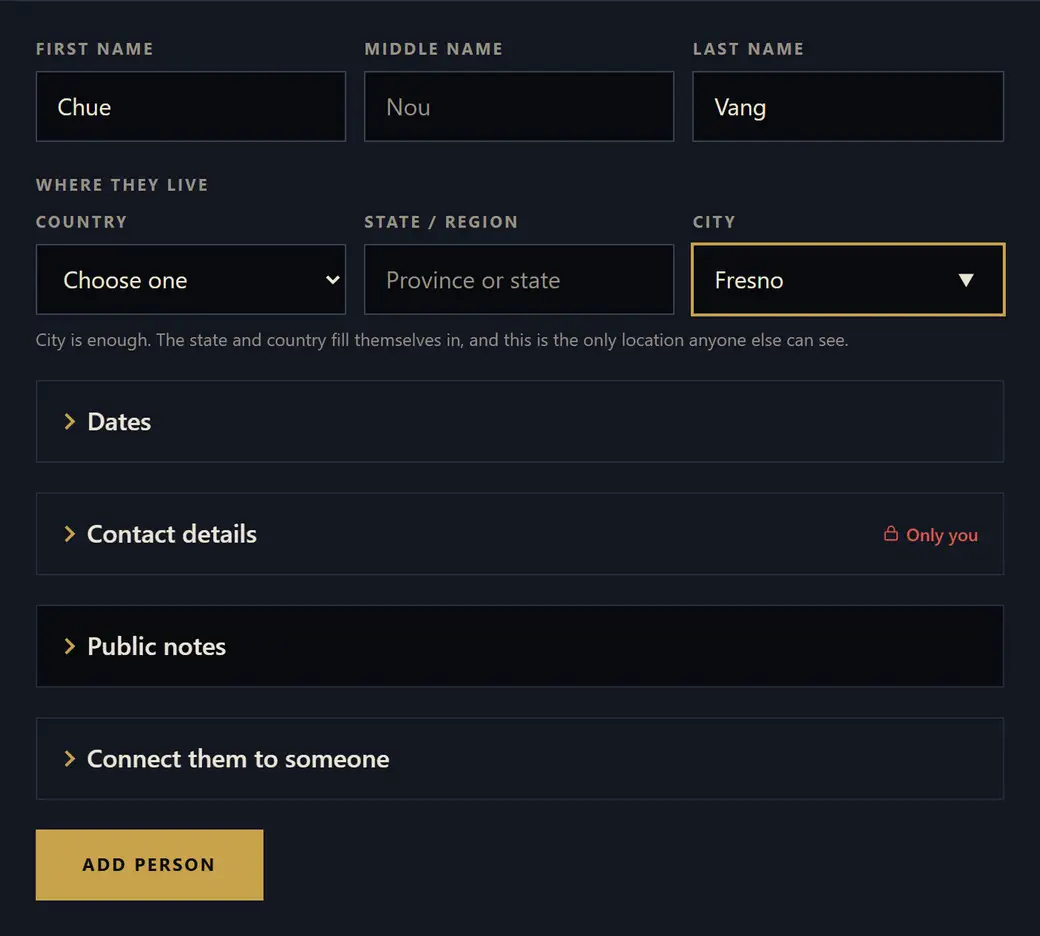
Put in the people you are sure of
A name is the only thing actually required. Start with the two or three people you could not possibly get wrong, your parents and your grandparents, and let the rest arrive over several evenings.
City is enough for the place. The state and country are worked out from it when you save, which is why the country box can still say “Choose one” while the city says Fresno. The city is also the only location any other person is ever shown.
Dates, contact details and notes are all folded away because none of them are needed today. If you only know roughly how old somebody is, there is a box for that instead of a birthday.
Sitting with an elder and writing fast? Paste a list and Import a spreadsheet take many people at once.
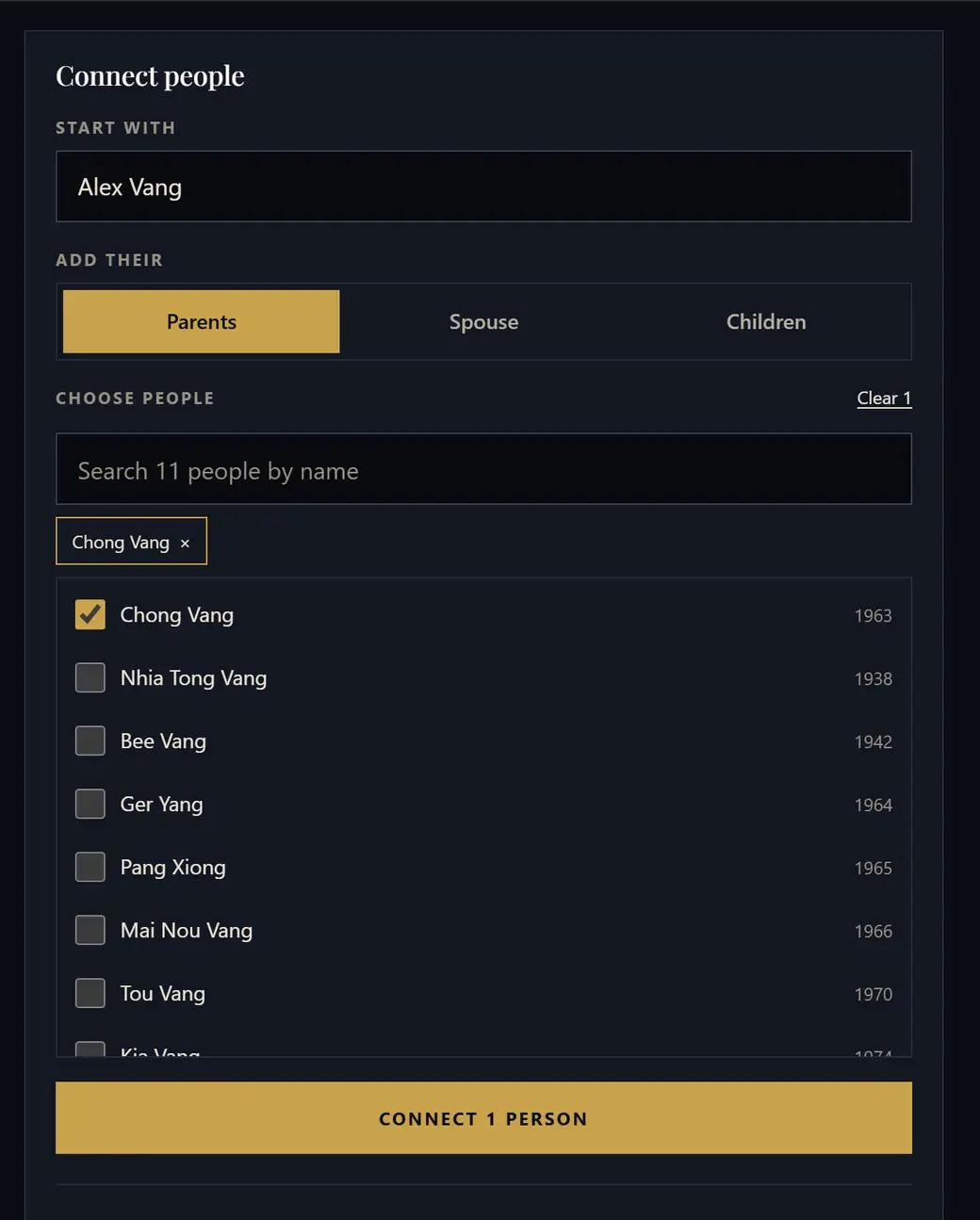
Say how they are related
This is the part that does the work, and it reads like a sentence: start with one person, choose Parents, Spouse or Children, then tick everybody who belongs there. Several at once: four children in one go, not four trips through a form.
You never drag anyone into place. There are no positions to get right: the diagram works out the generations from the connections and lays itself out. Put a link in the wrong place and the fix is to remove that link, not to move a box.
Every connection is listed underneath, and each one has an × beside it.
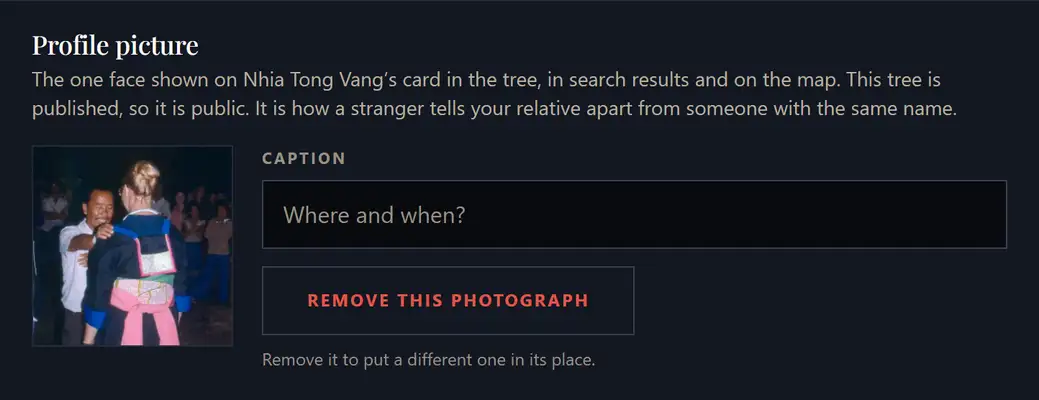
Put a face to each name
Open anyone from the family list and there is room for one photograph. One, deliberately. It is a profile picture, not an album, and it is how a relative tells your Tou Vang from the other three Tou Vangs in the search results.
Big photographs are shrunk on your own device before anything is sent, and the GPS tag your phone writes into a picture is stripped along with them. Neither the original file nor the place it was taken leaves your phone.
The caption is optional and saves when you click away. To use a different picture, remove this one first.
Keep the private things private
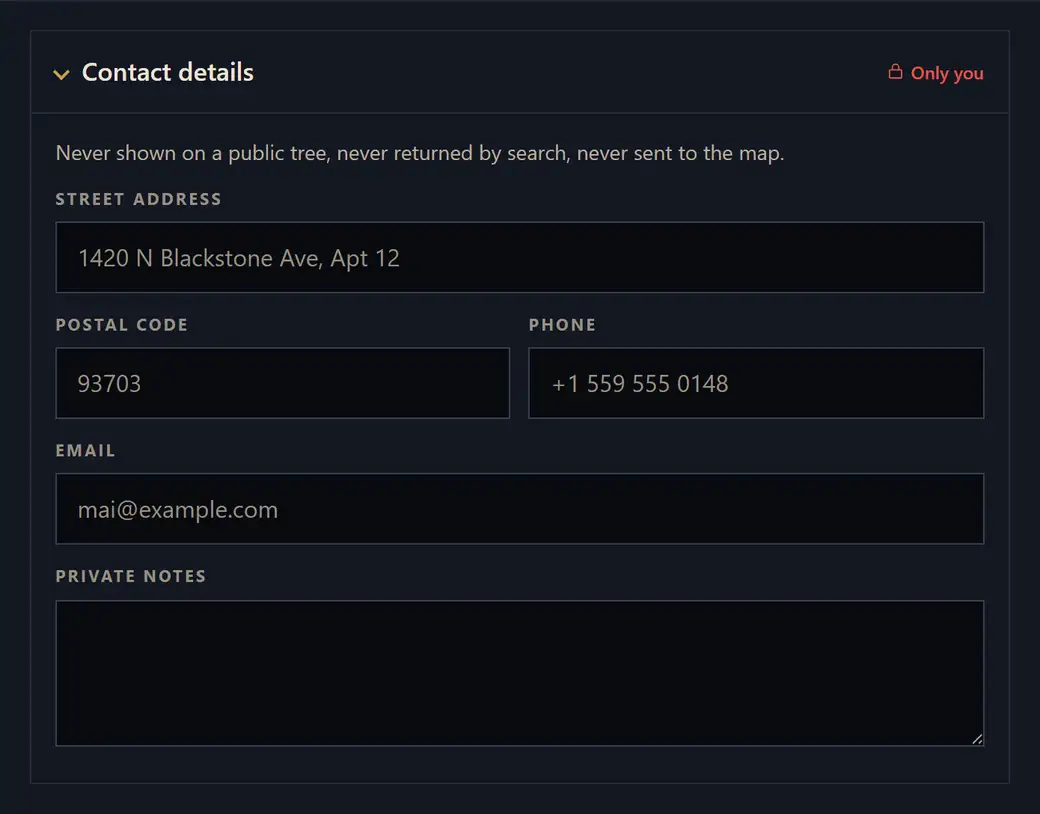
Street address, postal code, phone number, email and private notes sit behind a lock marked Only you. They are stored apart from everything else, and the rule is not a setting you could get wrong, because there is no switch that publishes them.
They are never on a public tree, never returned by a search, never sent to the map, and not included in a shared link even for somebody you invite to help edit. The geocoder that turns a city into a pin is only ever handed the city.
What the rest of the world can see is a short list: name, city, the years, a photograph, and how people connect. What is public, in full
Decide who can see it
Three settings, and the strip tells you in a sentence what the one you have chosen actually means.
- Hidden. Yours alone. Not in search, not on the map, no link works.
- Private. Still off the map and out of search, but a link you hand out will open.
- Public. Findable. It joins the world map and the search, and a cousin looking for the clan name can reach it.
It moves both ways. Publishing is not a door that locks behind you: set it back to private and it leaves the map and the search again.

Send a link, or ask for help
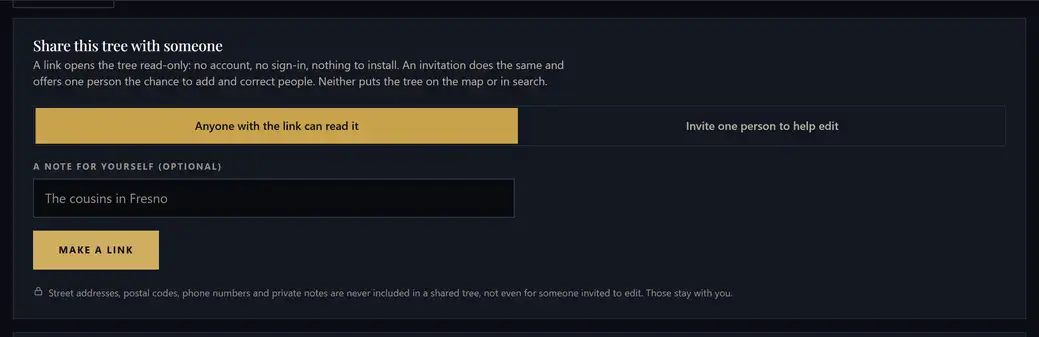
A link opens the tree read-only. No account, no sign-in, nothing to install, which matters for a group chat full of relatives who are never going to make a password.
An invitation goes further. One person, by email, and once they open it they can add and correct people themselves. An aunt who remembers the names can fill them in without you typing while she talks.
Neither one publishes anything. A shared tree stays off the map and out of the search, and the contact details stay with you.
A link is shown once, when it is made. Only a fingerprint of it is kept, so nobody, including us, can read it back out afterwards. Any link can be revoked.
Then your family can find you
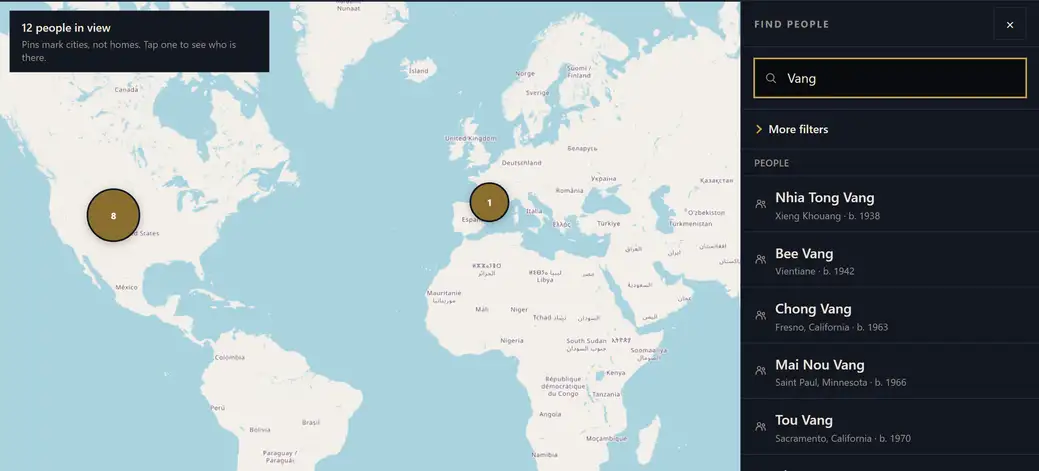
A published tree joins the map and the search. Search by name, by clan, by city, or by roughly how old somebody would be now. Spellings of a clan are matched together, so Vang, Vaj and Va find one another.
Every pin sits at the centre of a city, never at a home. That is not a preference you can change, and the pins are not scattered about to look natural either, because a jittered pin would imply a precision that the map deliberately does not have.
One clan across four continents in a single generation is an ordinary Hmong story. The map is the one view that puts it back together.


That is the whole of it
Free, with no advertising. Start with the two or three people you are certain of and add the rest as you find them.
Wondering what other people can see? How privacy works